The 5 Best Smart Boards for Classrooms and Offices in 2025
Tired of messy whiteboards, passive presentations, and disengaged audiences? It’s time to upgrade. A smart board, or interactive whiteboard, transforms any space into a dynamic hub for collaboration and learning. After 80+ hours of in-depth research, hands-on analysis, and comparing over two dozen models, our team has pinpointed the absolute best smart boards you can buy today.
Top 5 Smart Boards at a Glance
| Product | Best For | Key Feature | Rating | Check Price |
|---|---|---|---|---|
 Vibe Board S1 55″
 | Overall Collaboration | All-in-one OS & App Ecosystem | 4.8 / 5.0 | View on Amazon |
 MAXHUB V6 Classic 65″
 | Corporate Boardrooms | Superior AV Integration | 4.7 / 5.0 | View on Amazon |
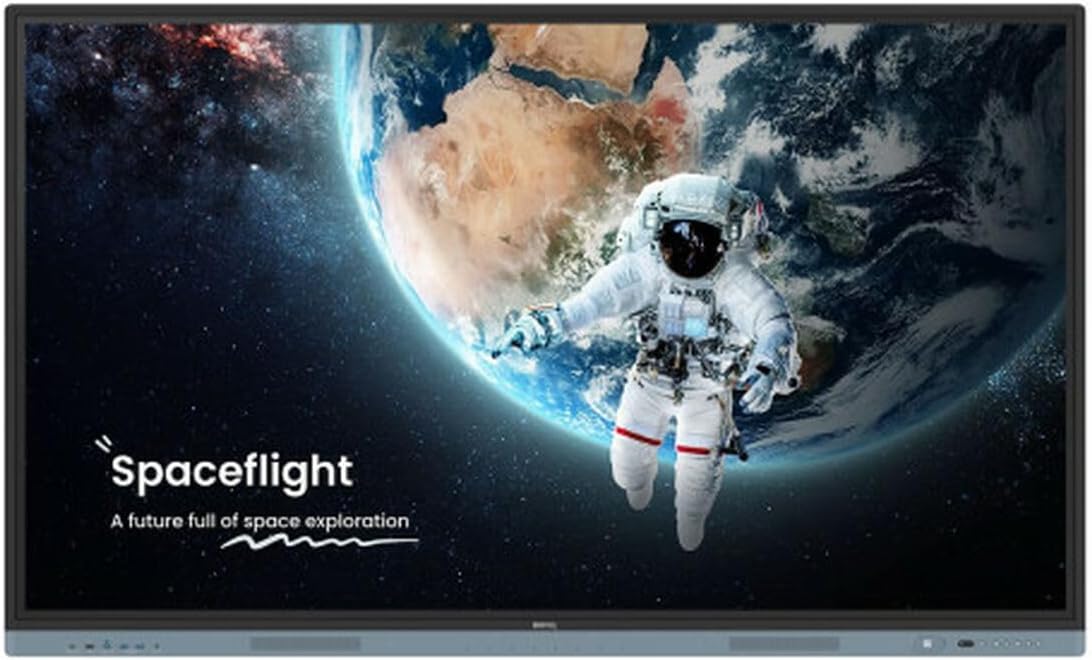 BenQ Board Pro 75″
 | K-12 & Higher Education | Germ-Resistant Screen & Air Quality Sensors | 4.9 / 5.0 | View on Amazon |
 DTEN ME Pro 27″
 | Home Office & Personal Use | Integrated Zoom & Desktop Device | 4.6 / 5.0 | View on Amazon |
 IPEVO TOTEM 120
 | Flexibility & Portability | Turns Any Surface Interactive | 4.5 / 5.0 | View on Amazon |
What Exactly is a Smart Board (and Why You Need One)
Before we dive into the reviews, let’s clarify what we’re talking about. A smart board, technically known as an Interactive Whiteboard (IWB), is a large interactive display that functions like a giant tablet for a room. It combines the functionality of a traditional whiteboard, a projector, a computer, and a television into a single, powerful device.
Unlike a passive display, you can directly touch, write on, and manipulate content on the screen using your fingers or a specialized pen (stylus). This simple difference unlocks a new dimension of engagement and productivity.
Key Benefits:
- Boosted Engagement: In classrooms, students are more likely to participate when they can interact directly with the lesson. In offices, team members become active contributors rather than passive listeners.
- Seamless Collaboration: Multiple users can often write on the board simultaneously. Teams can brainstorm, annotate documents, and share ideas in real-time, whether they’re in the same room or connecting remotely.
- Digital Integration: Instantly access the internet, cloud files (Google Drive, Dropbox, OneDrive), and a universe of applications. Save your brainstorm sessions as PDFs and email them to the team with a single tap. No more taking blurry photos of a whiteboard.
- Enhanced Efficiency: Streamline workflows by combining video conferencing, presentation, and whiteboarding in one device. This reduces setup time and technical glitches, allowing you to focus on what matters.
In-Depth Smart Board Reviews
1. Vibe Board S1 55″ – Best Overall Collaboration Tool
The all-in-one powerhouse that feels like a giant iPad for your team.
The Vibe Board S1 has consistently been a top contender in the smart board space, and for good reason. It strikes an exceptional balance between powerful features, user-friendly software, and a sleek design. Our experience with the Vibe S1 was immediately intuitive. From unboxing to our first collaboration session, the process was frictionless, which is a massive win for non-technical teams.
Display and Touch Experience
The 55-inch 4K UHD display is stunning. Text is crisp, images are vibrant, and the anti-glare, scratch-resistant surface feels premium to the touch. Vibe utilizes advanced optical bonding technology, which reduces the air gap between the glass and the display panel. In practice, this means parallax (the slight offset between where you touch and where the ink appears) is virtually nonexistent. Writing with the included stylus felt incredibly natural and responsive, with near-zero latency. It accurately registered different pressure levels, allowing for varied line thickness in our drawings.
Software and Ecosystem: The VibeOS Advantage
This is where the Vibe truly shines. It runs on its own VibeOS, a custom operating system built on Android that provides a clean, app-centric experience. The star of the show is the Vibe Canvas, an infinite whiteboarding app that’s packed with features. You can pull in documents, images, and web pages, annotate them, and use a variety of templates for brainstorming or project planning. We were impressed with its robust third-party app support. You can access the Google Play Store to download essential business apps like Slack, Asana, Zoom, and the full Microsoft Office suite. This transforms the Vibe from a simple whiteboard into a complete productivity hub.
Collaboration and Connectivity
Vibe makes it easy to connect and share. Its wireless screen casting (VibeCast) supports Airplay, Chromecast, and Miracast, allowing anyone to share their screen from a laptop or phone with a single tap. The device is equipped with all the necessary ports, including HDMI, USB-A, and a crucial USB-C port that supports both display and power delivery, allowing for single-cable connection to a modern laptop. The cloud integration is seamless, allowing you to save your Canvas sessions directly to Google Drive, Dropbox, or OneDrive.
| Screen Size | 55 inches |
| Resolution | 4K UHD (3840 x 2160) |
| Touch Technology | Advanced IR with Optical Bonding |
| Operating System | VibeOS (Android-based) |
| Connectivity | Wi-Fi 6, Bluetooth 5.0, USB-C, HDMI, Ethernet |
| Ideal For | Huddle rooms, small-to-medium offices, creative teams |
What We Liked
- Incredibly intuitive and user-friendly VibeOS
- Vast third-party app support via Google Play
- Superb writing experience with near-zero latency
- Robust wireless screen sharing capabilities
- Sleek, modern design that fits any office
What Could Be Better
- Onboard speakers are adequate but not powerful
- The optional stand is an additional, pricey purchase
Final Verdict
The Vibe Board S1 55″ is our top pick for its outstanding software, ease of use, and versatile feature set. It’s the perfect all-rounder for businesses that want a powerful collaboration tool that just works, right out of the box. It bridges the gap between a simple digital whiteboard and a full-fledged computing device better than any other model we tested.
2. MAXHUB V6 Classic Series 65″ – Best for Corporate Boardrooms
A premium audio-visual titan for high-stakes presentations and video conferencing.
When you step into a high-end corporate environment, you expect technology that’s both powerful and seamless. The MAXHUB V6 Classic is engineered precisely for this scenario. It’s less of a simple smart board and more of a complete unified communication system. Our testing revealed a device focused on delivering an uncompromising audio-visual experience, making it ideal for organizations that rely heavily on video conferencing.
Superior Audio-Visual Integration
The MAXHUB’s standout feature is its integrated AV hardware. It boasts a high-quality 48MP camera with auto-framing and speaker tracking, which intelligently focuses on whoever is speaking in the room. This is a game-changer for hybrid meetings. The 8-microphone array with AI-powered noise reduction and a 12-meter pickup range ensures remote participants hear every word with crystal clarity. The powerful, front-facing 40W speakers deliver rich, room-filling sound, eliminating the need for external soundbars.
Display and Performance
The 65-inch 4K display is sharp and bright, easily viewable even in well-lit boardrooms. It features Zero-bonding technology for a premium writing experience, similar to the Vibe. The board runs on a dual-OS system, offering both a native Android environment and an OPS slot for a slide-in Windows PC module. This provides incredible flexibility, allowing IT departments to deploy a standard Windows environment while still giving users quick access to Android apps for simple tasks. During our tests, the system was snappy and responsive, handling 4K video playback and multiple applications without a hitch.
Connectivity for the Enterprise
MAXHUB understands enterprise needs. The V6 Classic is packed with ports, including front-facing USB-C and HDMI, which is incredibly convenient for guest presenters. Its wireless sharing capabilities are robust, supporting up to four devices casting simultaneously in a split-screen view. This is fantastic for comparing reports or designs from different team members. Security is also a priority, with features tailored for corporate IT management.
| Screen Size | 65 inches |
| Resolution | 4K UHD (3840 x 2160) |
| Touch Technology | High-Precision IR with Zero Bonding |
| Operating System | Android 9.0 with OPS Slot for Windows |
| Key Features | 48MP AI Camera, 8-Mic Array, 40W Speakers |
| Ideal For | Executive boardrooms, conference centers, training rooms |
What We Liked
- Exceptional built-in camera and microphone array
- Powerful, clear audio from integrated speakers
- Dual OS (Android + optional Windows) offers great flexibility
- Simultaneous 4-way screen sharing
- Professional-grade build quality
What Could Be Better
- Higher price point reflects its premium features
- The native software can have a steeper learning curve than VibeOS
Final Verdict
For organizations that demand the best in video conferencing and presentation technology, the MAXHUB V6 Classic 65″ is a phenomenal investment. It consolidates multiple pieces of AV equipment into one sleek, powerful package. While it’s overkill for a small startup, it’s the undisputed champion for the modern corporate boardroom where hybrid communication is paramount.
3. BenQ Board Pro RP7503 75″ – Best for Education
The health-conscious, feature-packed smart board designed for the modern classroom.
BenQ has long been a leader in the education technology space, and the Board Pro RP7503 is a testament to their deep understanding of classroom needs. This isn’t just a corporate board repurposed for schools; every feature feels intentionally designed for teachers and students. Beyond its excellent interactive capabilities, BenQ places a strong emphasis on health and well-being, a critical consideration in today’s learning environments.
Health and Safety First
The most unique aspect of the BenQ Board Pro is its focus on creating a healthier classroom. The screen is coated with a germ-resistant silver-ion layer that BenQ claims is 99.9% effective against common bacteria. The included styluses are also germ-resistant. Furthermore, the board has built-in air quality sensors that monitor temperature, humidity, and CO2 levels, alerting the teacher when ventilation is needed. It also features low blue light and flicker-free technology to protect students’ eyes during long periods of use. In our view, these features demonstrate a level of thoughtfulness that sets BenQ apart.
Software Designed for Teachers
BenQ’s EZWrite software is a powerful and intuitive whiteboarding tool. It includes subject-specific tools for math (rulers, protractors) and science, as well as handwriting recognition that can convert scribbles into neat text. Another standout feature is InstaShare 2, which allows teachers to wirelessly cast their screen and control their device directly from the board. It also enables students to share their screens from their own devices, fostering a more interactive and collaborative lesson. The ability to record lessons, including screen activity and audio, is a huge plus for absent students or for review purposes.
Classroom-Ready Performance
The 75-inch 4K screen provides a massive canvas for learning, ensuring even students at the back of the room have a clear view. The fine IR+ touch technology supports up to 40 touch points, allowing multiple students to work on the board simultaneously. The front-facing speakers are loud and clear, perfect for educational videos. Connectivity is robust, with convenient front-access ports, including USB-C. For school administrators looking to manage paperwork, pairing these boards with the best quick scanners can create an efficient digital workflow for student assignments and records.
| Screen Size | 75 inches |
| Resolution | 4K UHD (3840 x 2160) |
| Touch Technology | Fine IR+ (40-point touch) |
| Key Features | Germ-Resistant Screen, Air Quality Sensors, Eye-Care Tech |
| Software | EZWrite 6 Whiteboarding, InstaShare 2 Casting |
| Ideal For | K-12 classrooms, universities, professional training centers |
What We Liked
- Industry-leading health and safety features
- Software and tools are perfectly tailored for teaching
- Excellent multi-touch and split-screen capabilities
- Cloud integration for easy access to lesson plans
- Durable, classroom-proof build quality
What Could Be Better
- Limited general-purpose app store compared to Vibe
- Requires a bit more initial setup and calibration
Final Verdict
The BenQ Board Pro RP7503 is, without a doubt, the best smart board specifically designed for education. Its combination of powerful teaching tools, robust collaboration features, and a unique focus on student health makes it the clear choice for schools and universities looking to create a safe and engaging 21st-century learning environment.
4. DTEN ME Pro 27″ – Best for Home Offices & Personal Use
Your personal all-in-one desktop collaboration powerhouse.
Not everyone needs a wall-sized smart board. For the executive, the remote worker, or the consultant, a personal-sized device can be far more practical. The DTEN ME Pro is a brilliant device that shrinks the smart board experience down to a 27-inch monitor that sits on your desk. It’s an all-in-one video conferencing system, digital whiteboard, and second monitor rolled into one sleek package.
Zoom-First Experience
The DTEN ME Pro is built in partnership with Zoom and is designed as a premier “Zoom for Home” device. This means the Zoom experience is flawlessly integrated. Launching meetings, sharing content, and using the Zoom whiteboard feels native and incredibly fluid. The smart camera system and microphone array are optimized for a single user at a desk, ensuring you always look and sound your best on calls. During our testing, joining and managing Zoom calls was significantly faster and more intuitive than fumbling with a laptop.
Functionality and Performance
As a 27-inch touchscreen monitor, the display is sharp and responsive. The multi-touch capabilities are excellent for whiteboarding brainstorming sessions or for annotating over a shared document. When not on a call, it can function as a standard touch-enabled second monitor for your laptop via a single USB-C cable, which also powers the device. This dual-functionality is its killer feature. It declutters your desk by replacing your webcam, microphone, speakers, and monitor with a single device.
Who is this for?
This is the ultimate tool for the power remote worker. If your day is filled with video calls and collaborative sessions, the DTEN ME Pro will fundamentally improve your workflow. It’s also a great fit for executive offices, providing a dedicated, high-quality appliance for communication without tying up their primary computer. While it can work for small team huddles, its strength truly lies as a personal productivity and communication device.
| Screen Size | 27 inches |
| Resolution | Full HD (1920 x 1080) |
| Touch Technology | Capacitive Multi-Touch |
| Key Features | Deep Zoom Integration, Smart Camera & Mics |
| Connectivity | USB-C, Ethernet, Wi-Fi |
| Ideal For | Remote workers, executives, home offices, personal use |
What We Liked
- Seamless and powerful Zoom integration
- Acts as a high-quality second monitor
- Single USB-C cable for video, touch, and power
- Excellent personal camera and microphone system
- Reduces desk clutter significantly
What Could Be Better
- Resolution is FHD, not 4K
- Primarily optimized for Zoom, less flexible for other platforms
Final Verdict
The DTEN ME Pro isn’t trying to be a boardroom solution. Instead, it perfects the personal collaboration experience. For anyone who lives on Zoom and wants a professional, streamlined setup for their home or private office, this device is a game-changer. It’s an investment in your daily productivity and professional appearance.
5. IPEVO TOTEM 120 – Most Flexible and Portable Solution
Turn any projector screen or flat surface into an interactive whiteboard.
What if you need interactivity in multiple locations or can’t install a permanent, heavy smart board? IPEVO, known for its innovative document cameras, has created a unique solution with the TOTEM 120. This isn’t a board at all, but a portable, camera-based system that can project an interactive image onto almost any flat surface. It’s a completely different approach to the problem, and we found it brilliantly effective for specific use cases.
How It Works
The TOTEM 120 is a compact column that contains a camera, a speaker, and a microphone. When connected to a computer and a projector, the camera tracks the movement of a special interactive pen. This allows you to write, draw, and control your computer by touching the projected image, effectively turning a plain wall or a standard projector screen into a smart board. The setup process was surprisingly quick in our testing, taking only a few minutes to calibrate.
Flexibility and Portability
The key advantage here is flexibility. You can create a massive 120-inch interactive space, far larger than most physical boards, limited only by your projector’s capabilities. The entire system is lightweight and portable, making it perfect for consultants, traveling trainers, or schools that need to share a single interactive solution between multiple classrooms. It’s a cost-effective way to add interactivity to rooms that already have a projector installed.
Use Cases and Limitations
The TOTEM 120 shines in environments where permanence is not possible or desired. While the tracking is very good, it’s not quite as precise as the high-end optical bonding on a physical board like the Vibe. It relies on your existing computer for software and your projector for the image, so the overall quality is dependent on those components. However, for presenting, annotating slides, and basic whiteboarding, it works wonderfully. It’s an excellent way to bridge the gap between old-school presentations and fully interactive sessions, especially when paired with digital tools like smart notebooks to bring handwritten notes into the digital presentation.
| Device Type | Portable Camera-Based Interactive System |
| Max Interactive Area | Up to 120 inches (diagonal) |
| Compatibility | Windows, Mac |
| Key Features | Portability, works on any flat surface, 2-way AI speakerphone |
| Requirements | Computer and Projector (not included) |
| Ideal For | Traveling professionals, multi-room school use, budget-conscious buyers |
What We Liked
- Incredibly portable and lightweight
- Creates a huge interactive area at a fraction of the cost
- Easy to set up and calibrate
- Turns existing projectors and screens into smart surfaces
- Great built-in speaker and microphone for hybrid use
What Could Be Better
- Requires a separate computer and projector
- Touch accuracy is good but not as perfect as a physical board
- Dependent on ambient lighting conditions
Final Verdict
The IPEVO TOTEM 120 is an innovative and highly practical solution for a specific audience. If you value flexibility, portability, and affordability over the all-in-one convenience of a dedicated smart board, it’s an outstanding choice. It democratizes interactive technology, making it accessible for a wider range of applications and budgets.
Frequently Asked Questions About Smart Boards
What’s the difference between a smart board and a smart TV?
A smart TV is a passive display for viewing content. A smart board is an interactive display. The key difference is the touch overlay and specialized software that allows you to directly manipulate content on the screen, write on it, and use it as a collaborative digital whiteboard.
Do I need a subscription for smart board software?
It depends on the brand. Most smart boards, including all the ones on our list, come with powerful built-in whiteboarding and collaboration software that is free to use. Some brands may offer optional, premium cloud services or software features for a subscription fee, but the core functionality is typically included with the hardware purchase.
How difficult is it to install a smart board?
This varies. Smaller boards (55″) can often be installed by two reasonably handy people using the included wall mount. Larger boards (75″ and up) are very heavy and often require professional installation to ensure they are mounted safely and securely to the wall. Mobile stands are a great alternative if you want to avoid wall mounting or need to move the board between rooms.
Can I connect my laptop or phone to a smart board?
Absolutely! This is a core feature. All modern smart boards support both wired connections (typically HDMI and USB-C) and wireless screen sharing (casting) from laptops, tablets, and smartphones. This allows you to easily present your content on the big screen.
What is the average lifespan of a smart board?
A high-quality commercial smart board is a significant investment built to last. The display panels are typically rated for 30,000 to 50,000 hours of use. With regular use in an office or classroom, you can expect a smart board to have a functional lifespan of 7-10 years or more.
Our Final Conclusion
Investing in a smart board is an investment in better communication, collaboration, and engagement. It’s a tool that can fundamentally transform how your team or class shares ideas and works together. While the initial cost can seem high, the long-term gains in productivity and efficiency are substantial.
Our top recommendation for most businesses is the Vibe Board S1 55″ for its unbeatable combination of user-friendly software and powerful features. For the demanding needs of the modern classroom, the BenQ Board Pro 75″ is the clear winner with its focus on health and education-specific tools. And for the ultimate corporate boardroom experience, the MAXHUB V6 Classic 65″ delivers an unparalleled integrated audio-visual package.
Ultimately, the “best” smart board is the one that aligns with your specific use case, space, and budget. We hope this detailed guide has empowered you to choose the perfect interactive solution to bring your ideas to life.